Every part of dispatch.
A screen for every step, from the moment an order arrives to the moment the cash is closed.
In short
kuryenoktam has four parts: the live dispatch panel for dispatchers, the restaurant portal, the courier mobile app and the API that POS systems connect to. All of them share one server, so a change in one place shows up everywhere instantly. Around them come per-screen roles and permissions, operations alerts and automatic digests, an SMS tracking link for customers and Excel/PDF reports with charts.
Live dispatch
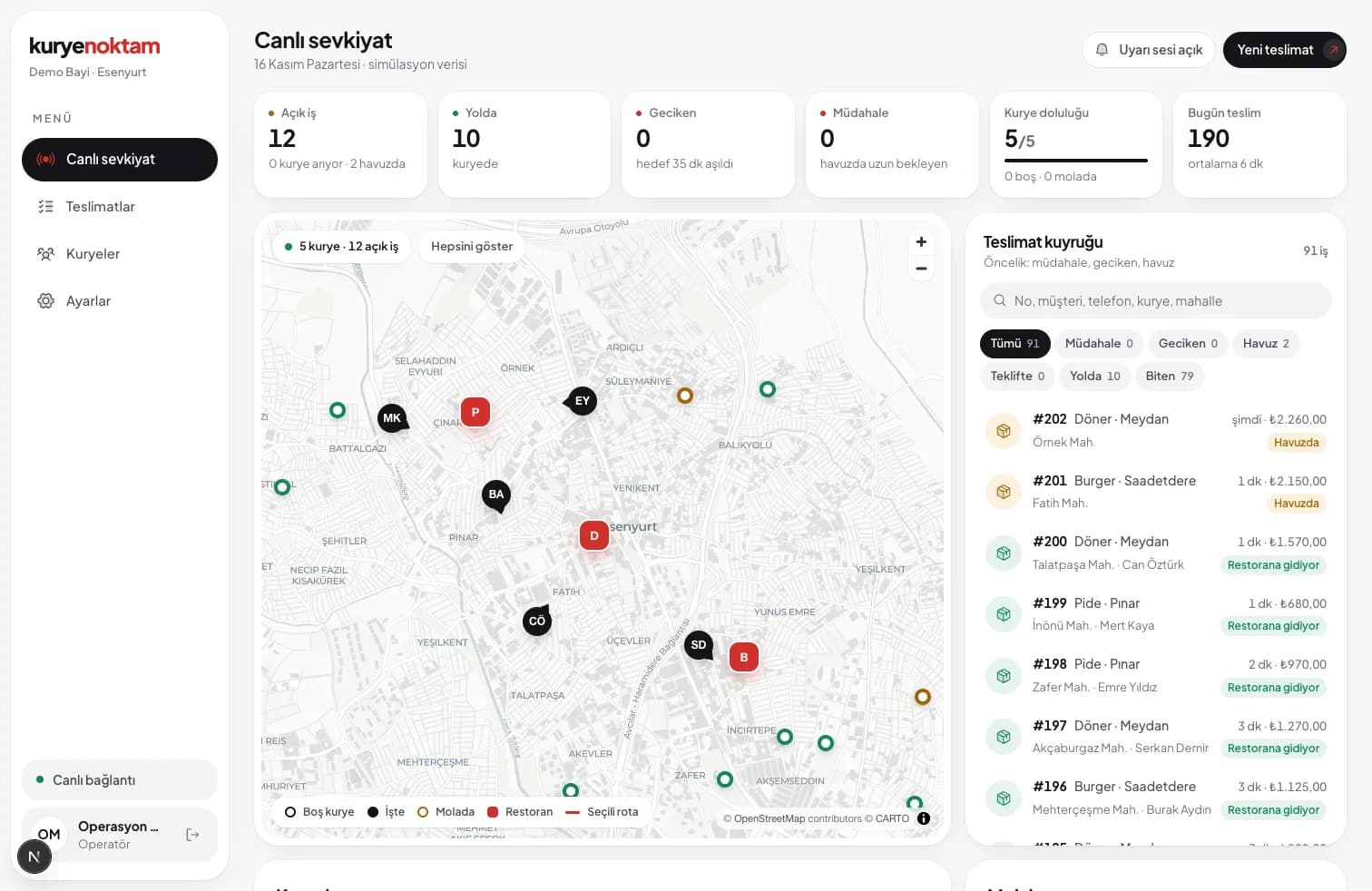
Map and prioritised queue side by side. Late, needs-attention and pooled orders sit at the top.
- Open, on the way, late, attention, courier load, delivered today
- Search and restaurant filter
- Alert sound for new and late orders
Automatic dispatch and routing
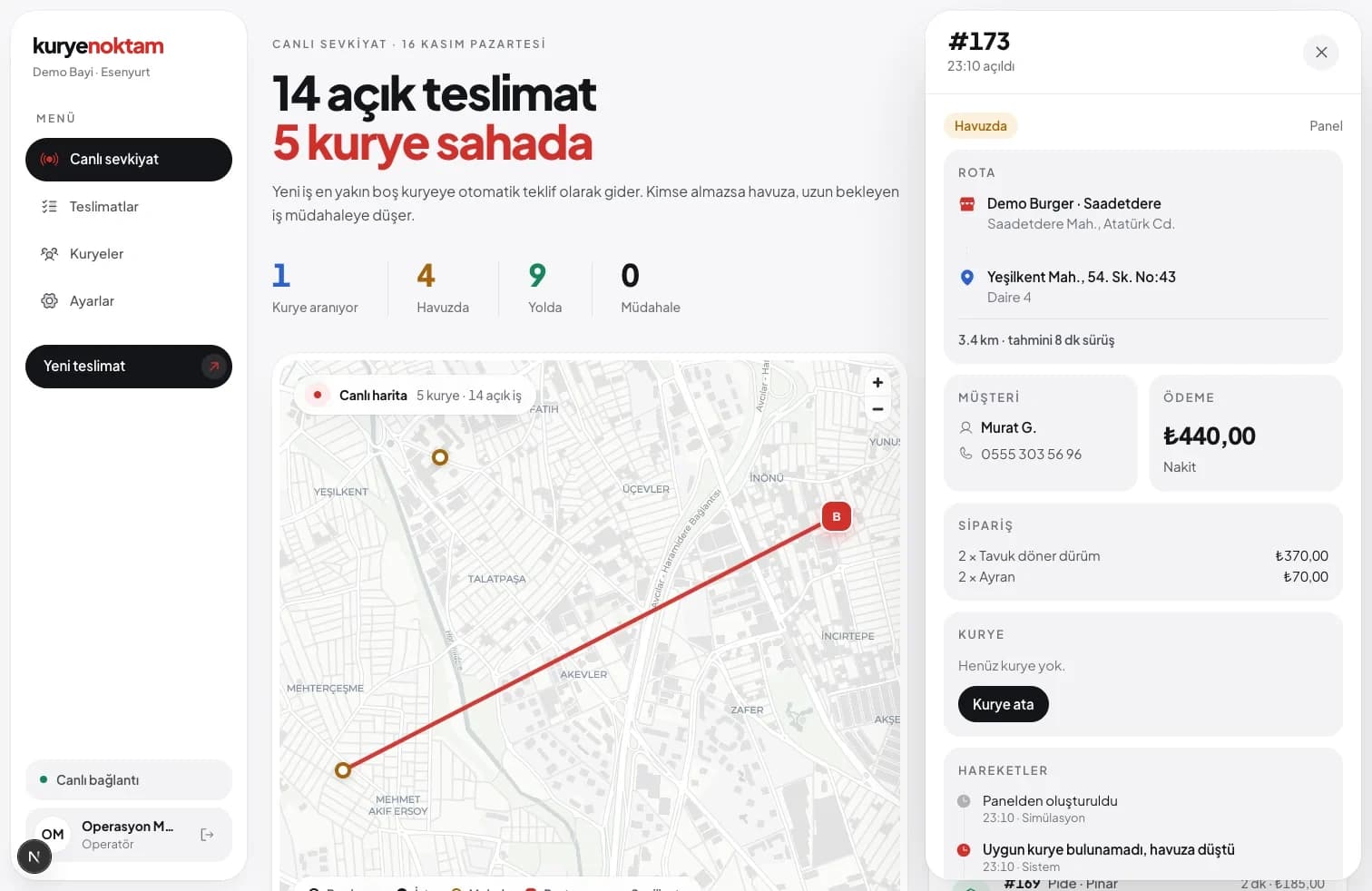
The closest candidates are scored by arrival time calculated on the Turkey road map at motorcycle speed. Offers are timed; if nobody accepts, the next courier gets it.
- Two-leg route: to the restaurant and to the customer
- Distance and minute estimates
- Falls back to an estimate if routing is unavailable
Operations

Pool
Unassigned orders drop into the pool for couriers to pick.

Breaks and approval
Couriers request a break, dispatchers approve.

Handover code
Orders change hands between couriers with a code.

Order actions
Ready, remove courier, close, undo cancel, fix payment.

Restaurant portal
Restaurants see only their own orders and account.

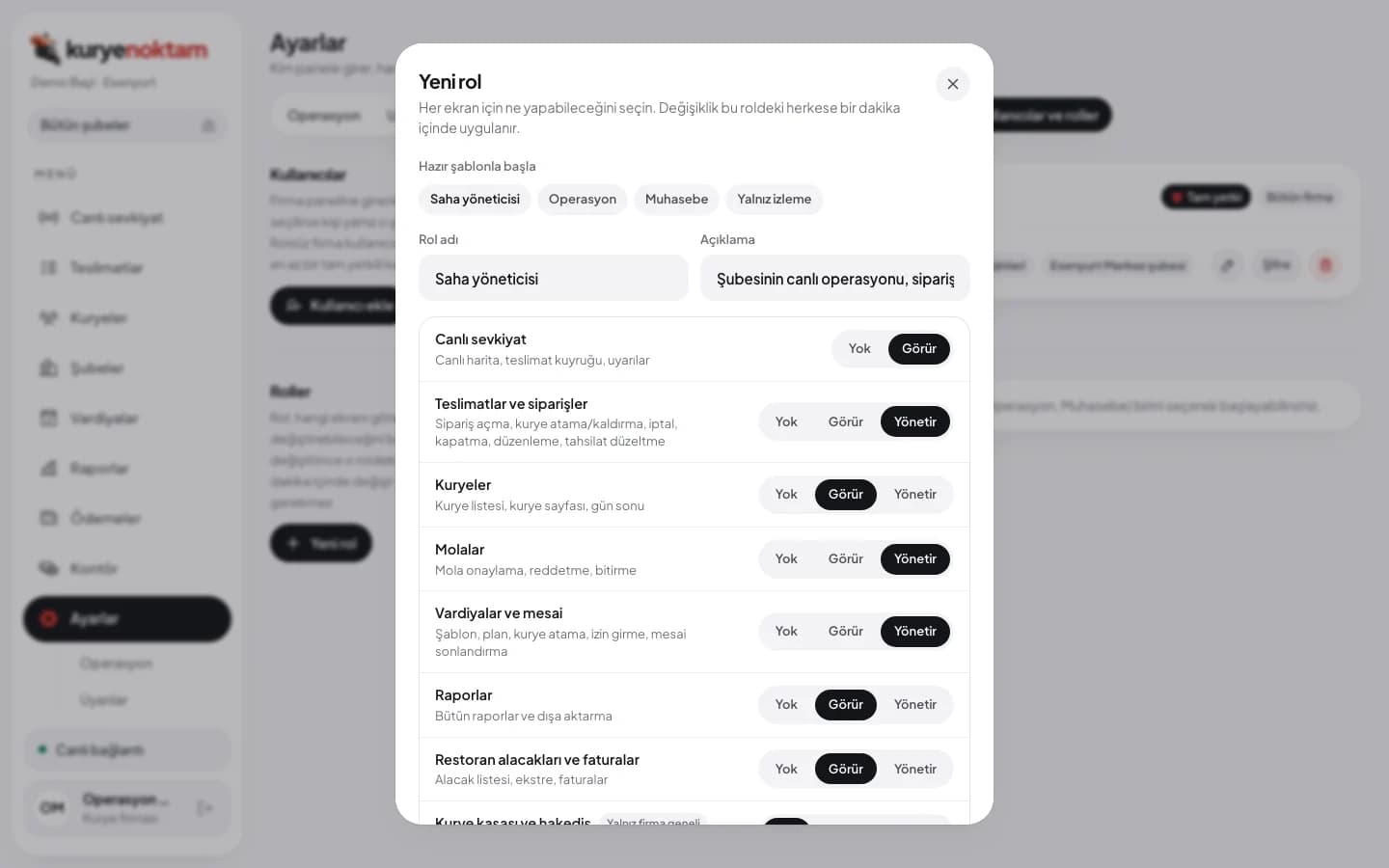
Roles and permissions
The owner defines roles; each screen is set to None, View or Manage.
Cash, courier pay and receivables
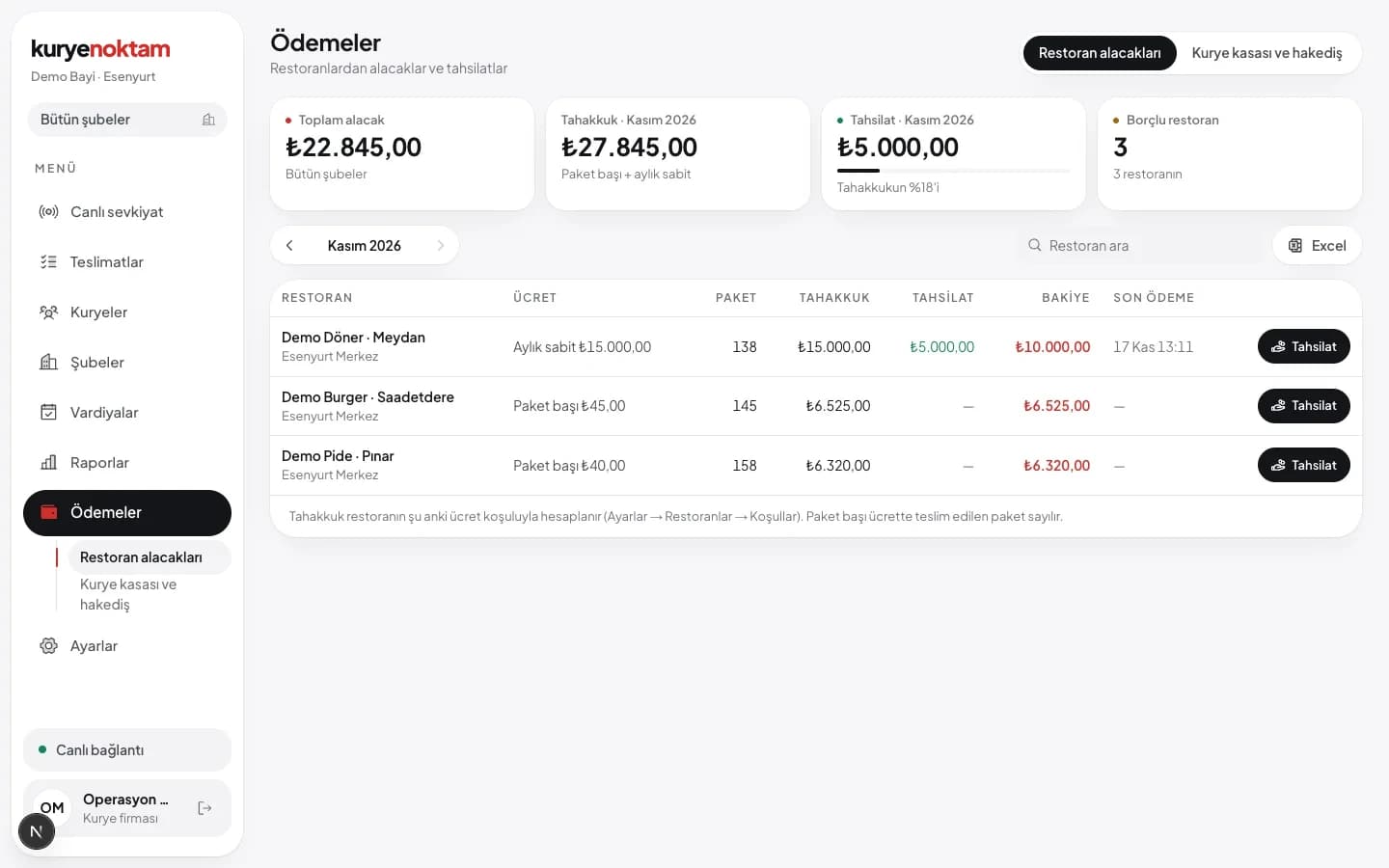
Courier cash is kept per delivery, and a handover cannot exceed the balance. Courier pay comes from order and km fees; restaurant receivables from the chosen fee type. Invoice drafts for restaurants are prepared at the start of each month.
- Courier bonuses and deductions added to pay
- Weekly courier pay email
- Monthly statement and invoice draft for restaurants
Shifts and reports
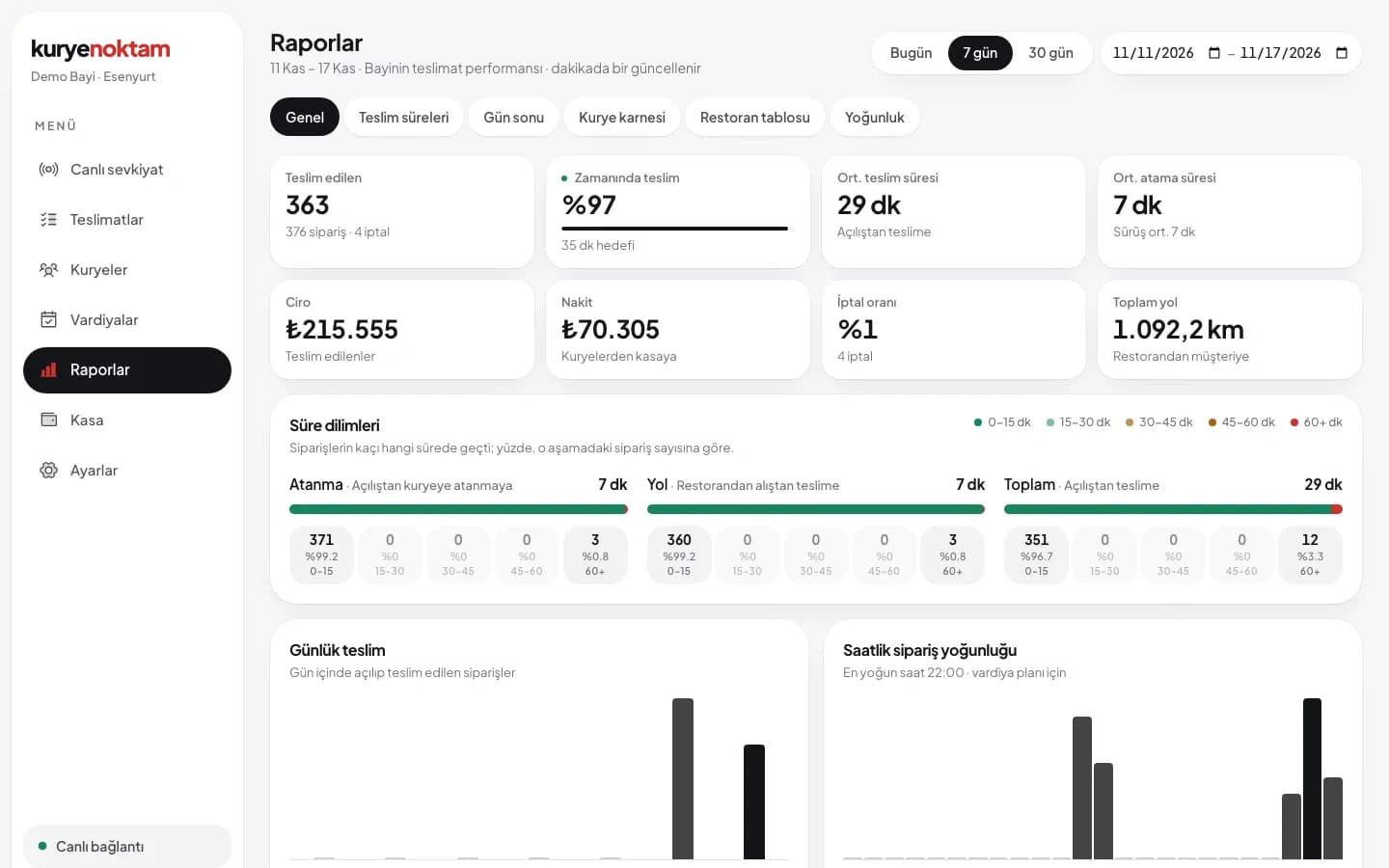
Shift templates, leave and working-hour rules. The daily report is corrected and approved; courier scorecards, restaurant matrix, peak hours, customer ratings and a heat map of drop-off points are in reports.
- Colour Excel files with charts
- A4 PDF that downloads in one click
- Branch filter on every report
Roles and permissions
The owner reaches everything; field managers and accounting see only the screens they need. Roles are defined per screen and given to users with a company or branch scope. Permissions are checked on the server, so a user cannot open a screen by typing its address.
- Screen × None / View / Manage
- Ready templates, as many roles as you need
- Branch managers see only their branch
Automations
The system scans operations every 30 seconds and runs the numbers overnight and at the start of each month.
Operations alerts
Late orders, orders stuck in the pool, couriers with no signal, cash limit. In the panel's Alerts tab and on the courier's phone.

Automatic offline
Silent couriers go offline, and shifts left open are closed.

Daily digest
Yesterday's deliveries, times and cash by email every morning.

Weekly pay
Courier pay and performance list every Monday.
Statements and invoices
Restaurants get a statement at month start; invoice drafts appear under Payments.

Planning
Alerts for an unapproved daily report, a silent POS and tomorrow's shift suggestion.
Customer experience

Tracking link and SMS
Customers see the courier on the map with an ETA.

Delivery rating
Customers rate the delivery on the same page; ratings show in reports.
Proof of delivery
Location, leave-at-door and photo are stored with the delivery.
Order batching
Two orders going the same way, one courier, one trip.
Delivery zones
Draw zones on the map; each zone can add a restaurant fee and extra courier pay.
Trendyol Go food
The restaurant's Trendyol Go orders land in the queue on their own.
Security and audit
SMS code sign-in
The panel and the courier app use a code sent to the phone.
New device email
Users are told when someone signs in from an unknown device.
Audit log
Who changed what on which order, and when, all on record.
Personnel file access log
Every view of a courier's documents is logged separately.
Which part is for whom?
| Part | Who uses it | What it does |
|---|---|---|
| Dispatch panel | Company owner, dispatchers, branch managers | Assignment, tracking, cash, shifts, reports, roles |
| Restaurant portal | Restaurant staff | Create orders, track, account |
| Courier app | Couriers | Offers, route, delivery, payment, documents |
| Tracking page | Customers | Follow the courier on the map, rate the delivery |
| API and webhooks | POS and software teams | Send orders, receive status |
Try it with your own fleet.
Let's set up your restaurants, couriers and order flow together. See the real screens in a demo account.